Share Your
Esports History
The ultimate extension designed specifically for streamers and pro players. Automatically track visited tournaments, display prize pools, and share your esports plans directly on your Twitch channel panel.
Install on Twitch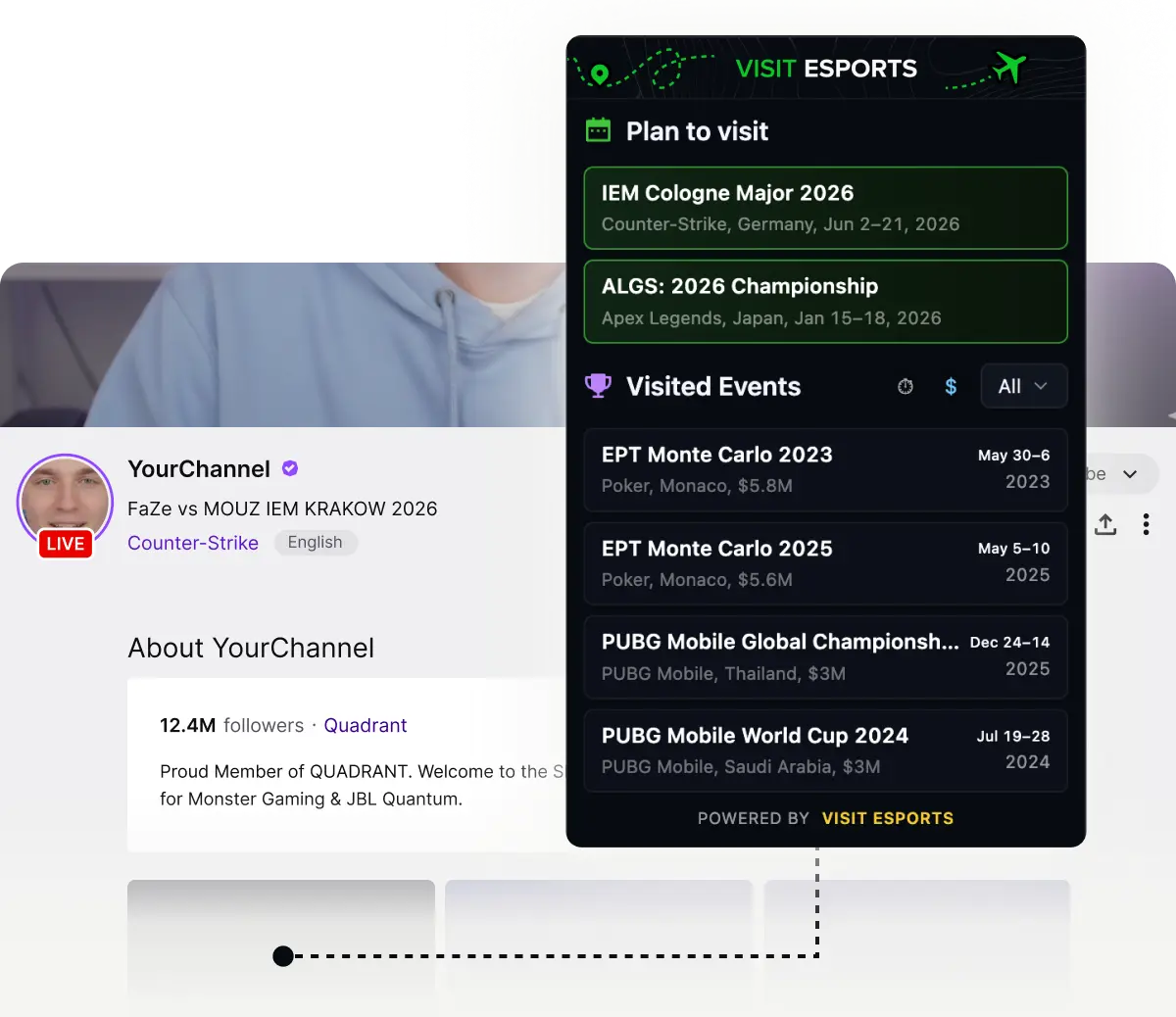
Level Up Your Channel Bio
Automated History
Forget manual updates. Automatically log every major event you attend, from prize pools to locations. Build your legacy effortlessly.
Share Your Esports Plans
Build hype for your next trip. Let your community know which upcoming Majors, LANs, or bootcamps you plan to attend.
Multi-Game Database
Powered by the Visit Esports database covering top titles like CS2, Dota 2, League of Legends, and more.
Premium Dark Mode UX
A sleek, modern panel designed to blend perfectly with professional Twitch channel aesthetics and dark mode themes.
Built For The Competitive Scene
Visit Esports is more than just a tracker; it's a storytelling tool built explicitly for streamers, analysts, and pros. Static text panels are outdated. Use our dynamic Esports Twitch Extension to professionally share your esports events history and keep your fans engaged with your career journey.
Ready to Showcase Your Journey?
Install the Visit Esports extension and start sharing your competitive story today.
Install on TwitchFAQ
How to keep track of upcoming esports tournaments?
Keeping up with the busy schedules of CS2, Dota 2, and LoL can be difficult. The easiest way to track esports tournaments and never miss a match is by using dedicated tracker tools or Twitch extensions like Visit Esports, which allow you to display live schedules and your personal event plans directly on your screen or channel.What are the best Twitch extensions to increase viewer engagement?
The best Twitch extensions add interactive and personalized elements to your channel panels. Extensions that display your gaming stats, stream schedules, or your esports event history are highly effective. They keep your audience engaged and give them a reason to interact with your profile even when you are offline.How do I add an event schedule or history to my Twitch panel?
Open the Twitch Creator Dashboard → Extensions, search for "Visit Esports", and activate it as a panel. Your visited tournaments and upcoming event plans will appear in your About section — the data comes from the Visit Esports tournament database, so schedules stay up to date automatically.
Is there a Twitch extension for CS2 and Dota 2 fans?
Yes, there are several tools built specifically for competitive gaming fans. You can install extensions that track live match scores, or use the Visit Esports Extension to share your personal journey, displaying which CS2 Majors, Dota 2 Internationals, or other tier-1 events you are following or attending.How can I customize my Twitch channel for an esports audience?
To make your channel stand out to esports fans, use extensions that highlight your competitive background. Adding widgets that show your favorite teams, rank, or a timeline of esports events you support helps build a community of like-minded competitive gaming enthusiasts.